
Posted May 27, 2026 by Kelly Tuttle, Manuscript Data Curation Fellow
In mid-May, Digital Scriptorium held a one-day workshop as part of the Digital Medieval Studies Institute (DMSI), which was held in Kalamazoo, Michigan just prior to the International Congress on Medieval Studies.
The workshop, Manuscript Description and Research in the Digital Ecosystem, led by DS’s own L.P. Coladangelo and Lynn Ransom, focused on the steps one takes to move an undescribed manuscript through description and cataloging using the DS schema into the world of Linked Open Data (LOD) and from there to researching using such LOD and SPARQL queries. It was an all day affair with lots of information and strategies.
The day started out with the workshop participants describing previously undescribed manuscripts from Western Michigan University’s collection (WMU). Each participant was given a fragment and, using this description template as a guide, wrote down everything they could observe about the fragment.
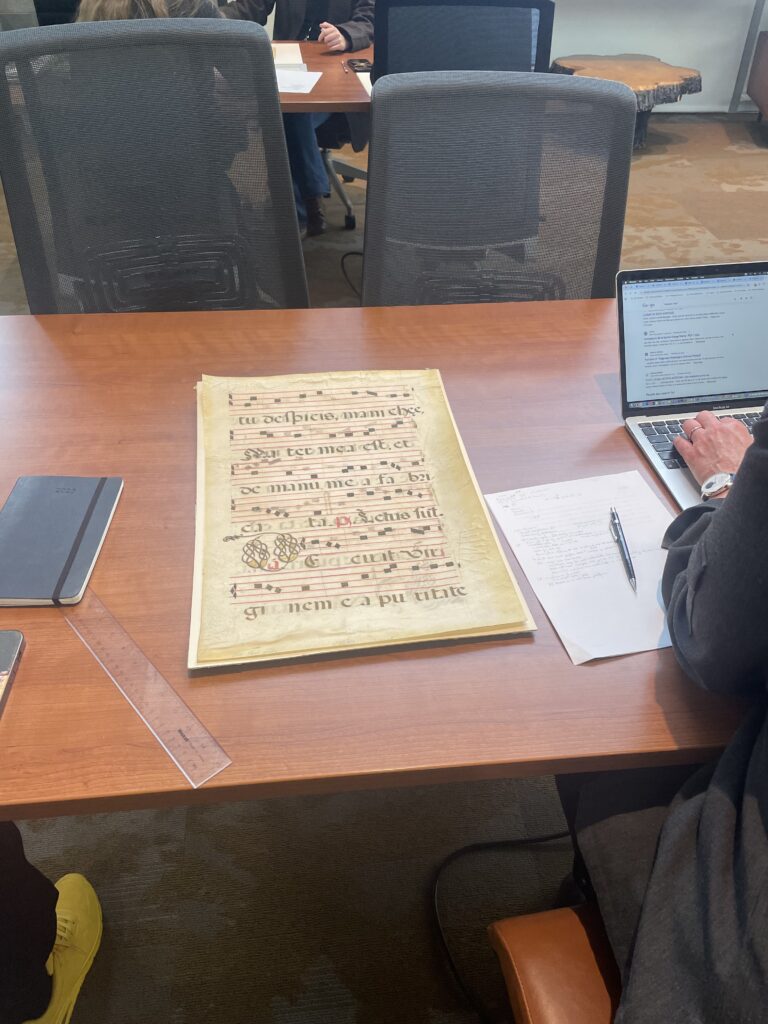
Once the description was as complete as they could make it, the next step was to think about how that information transferred onto a schema for cataloging and ingesting the info into the DS Catalog. Digital Scriptorium uses what we call the ds-csv, which is a map for organizing cataloging data that we receive from participating institutions, or from people describing the manuscripts with which they are working directly in the spreadsheet. In the case of the DMSI, the workshop participants added their information directly to a ds-csv, which will then be ingested into DS as part of the WMU holdings next time they are updated.
After lunch, it was time for SPARQL and more information about LOD. If you are familiar with SPARQL, you can stop reading here and jump to the end of this post. If not, then read on and you can practice building a query. We’ll go through it step by step.
Thinking About Queries
SPARQL, as you may know, can be used to start answering more complex research questions that you cannot answer by looking through databases using only the faceted search parameters. SPARQL has two necessary parts, however, before it becomes truly useful to a researcher. The first part is figuring out how to ask questions that can be answered by the dataset. And the second is learning how actually to write out the queries to get that answer. The DMSI workshop attempted to show participants both aspects of SPARQL, but it is frankly a lot of information and may have been a little too much a little too fast.
Participants were asked to think about a research question that could possibly be answered by the dataset available in the DS Catalog. To do that, you need first to understand what kind of information is available in the DS Catalog and what your options are for querying. Since they had just filled out the ds-csv, the participants had an idea of the types of data that they could query. They still needed some guidance for figuring out the types of questions they could ask, however. If you are following along right now, you may find this article about the Mapping Manuscript Migrations project (MMM) to be useful background reading for figuring out how to phrase your research questions so they are answerable by SPARQL. The main thing is to think about how the data is organized and how to ask it questions so that “the logical pieces of meaning can be mechanically manipulated by a machine to useful human ends” (qtd. in Burrows, et al., 2022). Making the jump between what makes sense to a machine and what makes sense to a human can sometimes be difficult to figure out when just starting.
As described in Burrows et al. (2022), one way to think about constructing a SPARQL query is
“Show me all things associated with this thing.” Then, a further relationship can be added to refine results: “Then show me all the things associated with those things that share this value.” Further triple statements can be added to the query indefinitely to execute a variety of search functions. The query, then, is only limited by three things: the researcher’s ability to think of new questions to ask or new associations to make; how well the associations have been expressed in the data model in relation to the data; and how well the data has been structured so that the required data elements are accessible to the computer performing the search (para. 16).
The DS Catalog has been structured in a way that makes it accessible for a computer searching, so now it is down to researchers to figure out questions to ask. Distinguishing between workable and nonworkable questions is something that takes practice. For example, this question from the MMM project won’t work well, “What was the most popular text by a medieval author in France in the seventeenth-century?” It doesn’t work because you can’t really define in the structured data values what ‘popular’ means. You can find numbers of copies of texts and who wrote them in 17th century France, but that may not be what you are actually trying to answer. Similarly, you can’t ask of the DS data, “Show me all women associated with Islamicate manuscripts,” because that would involve a federated query with Wikidata (which can be done, but is more complicated) and require that the sex of all the people associated with the DS manuscript data had been entered into wikidata, which is unlikely since sex is often not recorded.
In order to help the workshop participants understand possible questions, some example queries were made before the workshop took place so that participants could run them in the DS SPARQL endpoint and see the results for themselves. Let’s walk through the steps of one such query now so you can see the constituent pieces. For each portion of the query, you can copy and paste each section into the query service as it is added and run the queries piecemeal to see how the whole query is constructed.
This is what we want the query to do, “Show me in DS all devotional works produced between 1350 and 1625 that are not written in Latin and not books of hours or psalters, and show me where they come from.” This is not a question that you can answer just by faceted searching in the catalog; it is too complex. It is answerable by querying the DS data. Before we start,we can verify that DS does have all of this information in its structured data. Are there genre/subject terms about devotional works? Yes. Are dates available? Yes. Are languages available? Yes. Is the type of book, i.e., standard title available? Yes.
Building the Query
Before you start anything, go to the DS Query Service and put this list of prefixes at the start of the query (this avoids having to repeat URIs in the query itself). Note that anything with a pound sign (#) in front of it tells the computer to ignore it, so you can put notes to yourself there to remember what you are doing. When you paste the code in the query interface you will see color coding appear, which helps you keep track of what’s what and facilitates legibility.
# prefixes
PREFIX wd: <https://catalog.digital-scriptorium.org/entity/>
PREFIX wds: <https://catalog.digital-scriptorium.org/entity/statement/>
PREFIX wdv: <https://catalog.digital-scriptorium.org/value/>
PREFIX wdt: <https://catalog.digital-scriptorium.org/prop/direct/>
PREFIX p: <https://catalog.digital-scriptorium.org/prop/>
PREFIX ps: <https://catalog.digital-scriptorium.org/prop/statement/>
PREFIX pq: <https://catalog.digital-scriptorium.org/prop/qualifier/>
PREFIX wikibase: <http://wikiba.se/ontology#>
PREFIX rdfs: <http://www.w3.org/2000/01/rdf-schema#>
After the prefix list, we are going to tell the query what we will want to be returned to us at the end. For this query, we want the record (i.e., the link), the recordLabel, the subject and genre terms, the language and the place. It is further telling the computer how to label the various columns that you are requesting and to group multiple terms or languages together in one column but separate them with a pipe (|). You can copy/paste what is below after the list of prefixes. Read what’s after the # to understand what the following group of directions is asking the query to do.
# find manuscript records, related subject and genre terms, languages, and places
SELECT ?record ?recordLabel (GROUP_CONCAT (DISTINCT ?termLabel;separator="|") as ?terms) (GROUP_CONCAT (DISTINCT ?languageLabel;separator="|") as ?languages) ?placeLabel
Now that we’ve said what we want, let’s start by finding devotional works, since that is the type of work we are looking for. First, read through the portion of the query below. We are basically saying, “Show me records where the genre or subject term is one of the following included authority terms” and then a longish list of terms associated with devotional works.
WHERE {
  # select records that are described with terms for devotional texts
  ?record p:P18 | p:P19 ?termStatement .
  ?termStatement pq:P20 ?term .
    FILTER (?term IN (wd:Q4903,wd:Q38696,wd:Q2950,wd:Q38457,wd:Q26699,wd:Q7131,wd:Q26968,
wd:Q26614,wd:Q4858,wd:Q7462,wd:Q26718,wd:Q7140))
For this query, we are looking for specific terms. So, if we search in the Wikidata DS Catalog, then we can find the various QIDs for terms (wd:) related to devotional works and put them in the query. In the query service, when you move the mouse over any of the blue sets of letters and numbers you will see what they represent and can verify that they are all related to devotional works. If you are wondering what those things labeled “p” or “pq” are, they are specific properties or qualifiers (look at the prefix list above). In this case they are “genre as recorded,” “subject as recorded,” and “term in authority file”. You can figure out which p’s you want by looking in the All Properties list in the DS Catalog on Wikidata. Also, learning to manipulate these p, pq, ps, etc. within your search takes practice, so if it isn’t making sense right now, that’s OK.
Before you can run this query, you will need to put this next bit at the end to tell the computer where to look for the info and how you want the results organized. Note that some of the columns we requested above (language, place) will be blank at this point because we haven’t asked for the information to be gathered yet. This following part can stay the same, at the end of the query, for every iteration that we go through. As we build the query, you will add new sections right before it.
SERVICE wikibase:label { bd:serviceParam wikibase:language "[AUTO_LANGUAGE],en".
                         ?record rdfs:label ?recordLabel .
                         ?term rdfs:label ?termLabel .
                         ?language rdfs:label ?languageLabel .
                         ?place rdfs:label ?placeLabel .
                         }
  }
GROUP BY ?record ?recordLabel ?placeLabel
Copy/paste these directions (all 3) in this order into the query service and hit the white arrow in a blue box. If your query won’t work, verify that you have copied all the curly brackets ({ }) in the query. If you are missing one of a pair, it won’t run.
The result of this query finds 869 items, but many of them are Books of Hours or Psalters, neither of which we want in our final result. But before we start taking things out, let’s add another limit to the search. This one will limit the results to just those items produced between 1350 and 1625. Add this text right after the FILTER section of the WHERE section (before the SERVICE section) from above. Don’t erase anything else.
# select records for items produced between 1350 and 1625
  ?record p:P23 ?dateStatement .
  ?dateStatement pq:P37 ?earlyDate .
  ?dateStatement pq:P36 ?lateDate .
  FILTER (YEAR(?earlyDate) > 1350 && YEAR(?lateDate) < 1625 ) .
Hit the white arrow again and see what you get.
The date restriction has dropped the number of results to 288. Now, we want to know of those 288 items, everything that is NOT Latin. So, first we need to tell the machine to look for items that also have a language as recorded (p21) that is a language in the authority file (p22) (since we can’t filter out a language without first telling it to check if a language is recorded). As a second step, we need to filter out items where the language recorded is Latin, which here is represented as wd:Q113.
# select records that have language information
  ?record p:P21 ?languageStatement .
  ?languageStatement pq:P22 ?language .

  # filter out records that have Latin as a language
    FILTER NOT EXISTS {
    ?record p:P21 ?excludeLanguage .
    ?excludeLanguage pq:P22 wd:Q113 .
      }
Again, copy/paste the above directions into your query above the SERVICE section. As you probably guessed, many more items get ruled out because Latin is a common language for devotional works in DS. We only have 68 items that fit all of our parameters now and many of the books of hours and psalters have already been filtered out since they are in Latin. To make sure we get them all, let’s now take out everything that has a title of book of hours or psalter or has a related subject or a term. Again, we find these QIDs by looking in the Wikidata end of the DS Catalog and add them to the excluded terms list as wd:Q…. This part is structured similarly to the first part where we were looking for devotional items, except now we are telling the computer to take them out rather than add them in.
# filter out records that are described as books of hours or psalters
  FILTER NOT EXISTS {
    ?record p:P18 | p:P19 ?excludeTerm .
    ?excludeTerm pq:P20 ?excludedTerm .
    VALUES ?excludedTerm { wd:Q5889 wd:Q3618 wd:Q38439 wd:Q4134 wd:Q4323 wd:Q38532 }
    }

  # filter out records that have a standard title of book of hours or psalter
  FILTER NOT EXISTS {
    ?record p:P10 ?excludeTitle .
    ?excludeTitle pq:P11 ?excludedTitle .
    VALUES ?excludedTitle { wd:Q795 wd:Q660 }
    }
Copy/paste this part right above the SERVICE section. We have now ended up with 44 items that were produced between 1350 and 1625 are not in Latin and are not books of hours or psalters but are devotional works. There’s one more thing we want to know, which is where these items came from or where they were produced. We can add that as a last step to our query telling it to list that information if it is available. Copy/paste the direction below into your query above the SERVICE section.
# provide place of production information for those records that have it
  OPTIONAL {
  ?record p:P27 ?placeStatement .
  ?placeStatement pq:P28 ?place .
    }
We end up with 45 items (where did the extra one come from? I don’t know) that meet all of the criteria we specified. The thing about SPARQL though, is that you don’t have to run five separate queries to get this info. Instead, you put all of the requests and limits that you want performed on your data into one query and then run it, just as you did right now if you were adding in the various limits as we went along with this example. You can find the complete query in the example folder at the DS Query Service if you want to look at it again. There are also several other queries there that you can look at for examples and inspiration.
If you would like guided practice with how to build these queries using the DS Query Service, then you should sign up for a series of workshops that L.P. Coladangelo (DS Catalog Project and Data Manager) will be hosting. This set of workshops will let you practice and get more comfortable formulating queries while also researching whatever it is that interests you in the DS Catalog. Workshops are scheduled for Thursdays in July from 1pm to 2:30pm ET over Zoom. The workshop series is intended for those with beginning to intermediate knowledge of SPARQL. Descriptions follow:
July 2: Introduction to Linked Open Data and Wikibase
Participants will be introduced to the concept and structure of Linked Data in the context of Wikibase technology, including Resource Description Framework (RDF), triple syntax, and human readable serialization formats like Turtle (TTL). The workshop will also give an overview of the DS data model and way it is implemented in Wikibase. We will conclude by talking about important vocabularies and ontologies that help structure Linked Open Data (LOD).
July 9: SPARQL Basics
Participants will apply what they learned in the previous workshop to begin drafting basic SPARQL queries. Concepts to be explored will be the use of prefixes, SELECT and WHERE clauses, the assignment of variables, and the use of triples to define desired graph patterns.
July 16: Modifying SPARQL Queries
Having learned to write basic queries in the previous workshop, participants will now learn how to build on and modify queries through additional clauses for actions like filtering, sorting, grouping, and limiting.
July 23: Exploring Graph Patterns and Property Paths
After learning methods to modify queries from the previous week, participants will explore more advanced ways to query data, including alternative graph paths, variable value assignments through BIND and VALUES clauses, and an introduction to nested queries.
July 30: Extending and Combining Linked Data
In this final workshop, participants will build on their previous workshop experiences to begin using complex clauses to explore existing data and generate new datasets. Participants will also be introduced to methods for combining data from disparate datasets through federated querying and tools such as OpenRefine.
If you would like to attend these workshops, please click here to fill out the registration form. Please note that each workshop is intended to build on previous workshop sessions in the series, so please make every effort to attend all dates. Available seats and registration priority will be given to DS member representatives and staff at DS member institutions. You will receive a Zoom invite/link once your registration has been processed.